unittest Unit Testing
Python’s built-in unittest framework provides a complete set of tools for writing and running unit tests. It supports assertions, test suites, test loaders, and HTML report generation, making it suitable for both unit testing and automated testing scenarios. This article walks through the full feature set with runnable code examples.
unittest
unittest is Python’s built-in unit testing framework (module). It can not only complete unit testing but is also suitable for automated testing.
unittest provides rich assertion methods to determine whether a test case passes, then generates test result reports.
Environment Setup
First, prepare the following directory structure:
M:\tests\  # All operations are performed within the tests directory on drive M
    ├─discover
    │  ├─son
    │  │  ├─test_dict.py
    │  │  └─__init__.py
    │  ├─test_list.py
    │  ├─test_str.py
    │  └─__init__.py
    ├─loadTestsFromTestCaseDemo
    │  └─loadTestsFromTestCaseDemo.py
    ├─case_set.py
    ├─main.py   # Code demonstration file, all demo scripts
    ├─test_tuple.py
    └─__init__.py
If you follow along with this guide, please create and understand this directory structure. Currently all these files are empty — they will be filled in step by step. The __init__.py in each directory must also be created. Although it is empty, it is critically important, because it marks its containing directory as a Python package.
case_set.py has 4 functions that calculate addition, subtraction, multiplication, and division — and the code does not change:
# case_set.py
"""
    Test case set. The following 4 functions will become our test cases.
"""

def add(x, y):
    """ Add two numbers """
    return x + y


def sub(x, y):
    """ Subtract two numbers """
    return x - y


def mul(x, y):
    """ Multiply two numbers """
    return x * y


def div(x, y):
    """ Divide two numbers """
    return x / y


if __name__ == '__main__':
    print(div(10, 5))
    print(div(10, 0))
Basic Usage
Executing a Single Test Case
The following example is in main.py and calls our test cases above:
# main.py

import unittest  # Import the unittest framework
import case_set  # Import the test case set


class myUnitTest(unittest.TestCase):

    def setUp(self):
        """
            Test case initialization, fixed function, handles basic initialization operations
        :return:
        """
        print("Test case initializing: setup")

    def runTest(self):
        """
            Execute test case
        :return:
        """
        print(case_set.add(2, 3) == 5)

    def tearDown(self):
        """
            Clean up after test case execution
        :return:
        """
        print("Test case execution complete, cleaning up")


if __name__ == '__main__':
    demo = myUnitTest()
    demo.run()  # Fixed calling method: run

# Execution result
Ran 1 test in 0.002s

OK

Process finished with exit code 0
Test case initializing: setup
True
Test case execution complete, cleaning up
Notes:
The class name myUnitTest can be customized, but must inherit from unittest.TestCase.

The setUp and tearDown method names in the example are fixed.

However, if there is no initialization or cleanup work for the test case, setUp and tearDown can be omitted.

As for the runTest method name, it depends on whether parameters are passed when instantiating myUnitTest.
    Reading the source code: methodName='runTest'
    Therefore, to customize the runTest method name, specify the name when initializing the custom class:
        demo = myUnitTest(methodName='add_test')  # add_test is the custom runTest name
unittest.TestCase source code:
class TestCase(object):

    def __init__(self, methodName='runTest'):
        self._testMethodName = methodName
        self._outcome = None
        self._testMethodDoc = 'No test'  # Note this: No test

    def run(self, result=None):
        # The run method uses reflection on methodName
        testMethod = getattr(self, self._testMethodName)
From the source code above, we can see that during instantiation, there is a methodName default parameter which happens to be called runTest. When the instantiated object calls the run method, it reflects that methodName value and the test case executes normally.
So the runTest method name can be customized:
# main.py

import unittest
import case_set

class myUnitTest(unittest.TestCase):

    def add_test(self):
        """ Execute test case """
        print(case_set.add(2, 3) == 5)

if __name__ == '__main__':
    demo = myUnitTest(methodName='add_test')
    demo.run()
Executing Multiple Test Cases
When executing multiple test cases, you can define multiple test classes or define multiple test methods within the same class:
# main.py

import unittest
import case_set

class myUnitTestAdd(unittest.TestCase):

    def runTest(self):
        """ Execute test case """
        print(case_set.add(2, 3) == 5)

class myUnitTestSub(unittest.TestCase):

    def runTest(self):
        """ Execute test case """
        print(case_set.sub(2, 3) == 5)  # Test result does not match expectation

if __name__ == '__main__':
    demo1 = myUnitTestAdd()
    demo2 = myUnitTestSub()
    demo1.run()
    demo2.run()

# The above code can be simplified to the following format
import unittest
import case_set

class myUnitTest(unittest.TestCase):

    def add_test(self):
        """ Execute test case """
        print(case_set.add(2, 3) == 5)

    def sub_test(self):
        """ Execute test case """
        print(case_set.sub(10, 5) == 2)

if __name__ == '__main__':
    demo1 = myUnitTest('add_test')
    demo2 = myUnitTest('sub_test')
    demo1.run()
    demo2.run()
In the above approach, each test case requires one instantiation. Although multiple test cases can be executed this way, it is quite verbose and actually less concise than testing division cases individually.
Also, using print for output is not appropriate for a real testing environment.
Assertions
unittest.TestCase provides some assertion methods to check and report failures.
Here are some of the most commonly used methods:
| Method | Checks that | Description | New in |
|---|---|---|---|
| assertEqual(a, b, msg) | a == b | Assertion fails if a does not equal b | |
| assertNotEqual(a, b, msg) | a != b | Assertion fails if a equals b | |
| assertTrue(x, msg) | bool(x) is True | Assertion fails if expression x is not True | |
| assertFalse(x, msg) | bool(x) is False | Assertion fails if expression x is not False | |
| assertIs(a, b, msg) | a is b | Assertion fails if a is not b | 3.1 |
| assertIsNot(a, b, msg) | a is not b | Assertion fails if a is b | 3.1 |
| assertIsNone(x, msg) | x is not None | Assertion fails if x is not None | 3.1 |
| assertIn(a, b, msg) | a in b | Assertion fails if a not in b | 3.1 |
| assertNotIn(a, b, msg) | a not in b | Assertion fails if a in b | 3.1 |
| assertIsInstance(a, b, msg) | isinstance(a, b) | Assertion fails if a is not of type b | 3.2 |
| assertNotIsInstance(a, b, msg) | not isinstance(a, b) | Assertion fails if a is of type b | 3.2 |
Code example:
# test.py

import unittest


class TestStringMethods(unittest.TestCase):

    def test_assertEqual(self):
        """
        assertEqual: assertion fails if a does not equal b
        :return:
        """
        self.assertEqual(1, 2, msg='1 != 2')  # AssertionError: 1 != 2 : 1 != 2

    def test_assertTrue(self):
        """
        assertTrue: assertion fails if expression is not True
        :return:
        """
        self.assertTrue('')

    def test_assertFalse(self):
        """
        test_assertFalse: assertion fails if expression is not False
        :return:
        """
        self.assertFalse('')


if __name__ == '__main__':
    unittest.main()
All assert methods accept a msg parameter which, if specified, is used as the error message on failure.
Result example:
$ python test.py
F.F
======================================================================
FAIL: test_assertEqual (__main__.TestStringMethods)
----------------------------------------------------------------------
Traceback (most recent call last):
  File "test.py", line 7, in test_assertEqual
    self.assertEqual(1, 2, msg='1 != 2')  # AssertionError: 1 != 2 : 1 != 2
AssertionError: 1 != 2 : 1 != 2

======================================================================
FAIL: test_assertTrue (__main__.TestStringMethods)
----------------------------------------------------------------------
Traceback (most recent call last):
  File "test.py", line 10, in test_assertTrue
    self.assertTrue('')
AssertionError: '' is not true

----------------------------------------------------------------------
Ran 3 tests in 0.000s

FAILED (failures=2)

# In the result, F.F means: . indicates a passed case, F indicates a failed case.
# The result tells us 3 cases were executed, 1 succeeded, 2 failed: FAILED (failures=2).
# AssertionError is the error message.
Successful test example:
import unittest


class TestStringMethods(unittest.TestCase):

    def test_assertEqual(self):
        """
        assertEqual: assertion fails if a does not equal b
        :return:
        """
        self.assertEqual(1, 1, msg='The two values are not equal')

    def test_assertTrue(self):
        """
        assertTrue: assertion fails if expression is not True
        :return:
        """
        self.assertTrue(True)

    def test_assertFalse(self):
        """
        test_assertFalse: assertion fails if expression is not False
        :return:
        """
        self.assertFalse(False)


if __name__ == '__main__':
    unittest.main()

# Output result
$ python test.py
...
----------------------------------------------------------------------
Ran 3 tests in 0.000s

OK
Test Suite
A test suite (TestSuite) is a compound test made up of many test cases; it can also be understood as a container holding a collection of multiple test cases.
To use it, create a TestSuite instance object and use it to add test cases:
suite_obj.addTest(self, test)— adds a single test case.suite_obj.addTests(self, tests)— adds multiple test cases.- Adding test cases when instantiating.
After all test cases have been added, the test suite is handed to a test runner (executor) such as TextTestRunner, which executes the test cases in the order they were added and aggregates results.
TestSuite effectively solves:
- Since execution is sequential, there is no ambiguity about which case runs first when multiple cases form a chain of test operations.
- Effectively organizes multiple test cases together for centralized testing, solving the previous problem of testing one at a time.
Usage example:
# main.py
import unittest
import case_set

class myUnitTest(unittest.TestCase):

    def add_test(self):
        """ Execute test case """
        self.assertEqual(case_set.add(2, 3), 5)

    def sub_test(self):
        """ Execute test case """
        self.assertEqual(case_set.sub(10, 5), 5)

def create_suite():
    """ Create test case set """
    # Get two test case objects
    add = myUnitTest('add_test')
    sub = myUnitTest('sub_test')
    # Instantiate suite object
    suite_obj = unittest.TestSuite()
    # Add individual test cases
    suite_obj.addTest(add)
    suite_obj.addTest(sub)
    return suite_obj

if __name__ == '__main__':
    suite = create_suite()
    # Check the number of test cases in suite
    print(suite.countTestCases())  # 2
    # Get the runner object
    runner = unittest.TextTestRunner()
    # Pass the suite to the runner to execute
    runner.run(suite)
Adding test cases to the suite one by one is cumbersome. The code above can be simplified as follows:
import unittest
import case_set


class myUnitTest(unittest.TestCase):

    def add_test(self):
        """ Execute test case """
        self.assertEqual(case_set.add(2, 3), 5)

    def sub_test(self):
        """ Execute test case """
        self.assertEqual(case_set.sub(10, 5), 5)


def create_suite():
    """ Create test case set """
    '''
        # Get two test case objects
        add = myUnitTest('add_test')
        sub = myUnitTest('sub_test')
        # Instantiate suite object
        suite_obj = unittest.TestSuite()
        # Add test cases
        suite_obj.addTests([add, sub])
    '''

    # The above code can also be written like this
    map_obj = map(myUnitTest, ['add_test', 'sub_test'])
    suite_obj = unittest.TestSuite()
    suite_obj.addTests(map_obj)
    return suite_obj


if __name__ == '__main__':
    suite = create_suite()
    # Get the runner object
    runner = unittest.TextTestRunner()
    # Pass the suite to the runner to execute
    runner.run(suite)
Adding test cases at instantiation time:
import unittest
import case_set

class myUnitTest(unittest.TestCase):

    def add_test(self):
        """ Execute test case """
        self.assertEqual(case_set.add(2, 3), 5)

    def sub_test(self):
        """ Execute test case """
        self.assertEqual(case_set.sub(10, 5), 5)

def create_suite():
    """ Create test case set """
    map_obj = map(myUnitTest, ['add_test', 'sub_test'])
    suite_obj = unittest.TestSuite(tests=map_obj)
    return suite_obj

"""
Specific implementation of adding test cases at instantiation time:
class myUnitTestSuite(unittest.TestSuite):
    def __init__(self):
        # Pass test cases when instantiating the suite object
        map_obj = map(myUnitTest, ['add_test', 'sub_test'])
        # Call the parent class __init__ method
        super().__init__(tests=map_obj)

if __name__ == '__main__':
    suite_obj = myUnitTestSuite()
    runner = unittest.TextTestRunner()
    runner.run(suite_obj)
"""

if __name__ == '__main__':
    suite = create_suite()
    runner = unittest.TextTestRunner()
    runner.run(suite)
Although we have optimized the code to some extent, it is still not enough — we still need to manually add test cases to the suite. Next, let’s learn how to add them automatically.
Auto-Adding Tasks
To add test cases automatically, use the unittest.makeSuite class.
When instantiating unittest.makeSuite(testCaseClass, prefix='test'), tell makeSuite the class name of the test cases (in the example above, myUnitTest). Then makeSuite will automatically add all test cases in the myUnitTest class whose names begin with the prefix parameter.
# main.py

import unittest
import case_set


class myUnitTest(unittest.TestCase):

    def add_test(self):
        self.assertEqual(case_set.add(2, 3), 5)

    def sub_test(self):
        self.assertEqual(case_set.sub(10, 5), 2)

    def test_mul(self):
        self.assertEqual(case_set.mul(10, 5), 50)

    def test_div(self):
        self.assertEqual(case_set.div(10, 5), 2)


def create_suite():
    """ Create test case set """
    # The prefix parameter defaults to reading test cases starting with 'test'
    suite_obj = unittest.makeSuite(testCaseClass=myUnitTest, prefix='test')
    return suite_obj


if __name__ == '__main__':
    suite_obj = create_suite()
    print(suite_obj.countTestCases())  # 2
    runner = unittest.TextTestRunner()
    runner.run(suite_obj)
The prefix parameter defaults to reading test cases starting with test; you can also specify your own:
import unittest
import case_set

class myUnitTest(unittest.TestCase):

    def my_add_test(self):
        self.assertEqual(case_set.add(2, 3), 5)

    def my_sub_test(self):
        self.assertEqual(case_set.sub(10, 5), 2)  # AssertionError: 5 != 2

    def test_mul(self):
        self.assertEqual(case_set.mul(10, 5), 50)

    def test_div(self):
        self.assertEqual(case_set.div(10, 5), 2)

def create_suite():
    """ Create test case set """
    suite_obj = unittest.makeSuite(myUnitTest, prefix='my')
    return suite_obj

if __name__ == '__main__':
    suite_obj = create_suite()
    print(suite_obj.countTestCases())  # 2
    runner = unittest.TextTestRunner()
    runner.run(suite_obj)
As shown in the example above, all methods starting with my in the myUnitTest class are read. However, it is recommended to stick with the default test prefix.
You can also automatically add tasks while also manually specifying additional tasks:
import unittest
import case_set

class myUnitTest(unittest.TestCase):

    def my_add_test(self):
        self.assertEqual(case_set.add(2, 3), 5)

    def my_sub_test(self):
        self.assertEqual(case_set.sub(10, 5), 2)  # AssertionError: 5 != 2

    def test_mul(self):
        self.assertEqual(case_set.mul(10, 5), 50)

    def test_div(self):
        self.assertEqual(case_set.div(10, 5), 2)

def create_suite():
    """ Create test case set """
    # Auto-add tasks
    suite_obj = unittest.makeSuite(myUnitTest, prefix='my')

    # Manually append additional tasks
    suite_obj.addTests(map(myUnitTest, ['test_mul', 'test_div']))
    return suite_obj

if __name__ == '__main__':
    suite_obj = create_suite()
    print(suite_obj.countTestCases())  # 4
    runner = unittest.TextTestRunner()
    runner.run(suite_obj)
TestLoader
So far, all our test case methods have been encapsulated in a single test case class. However, sometimes we write different test case files based on different functionality, and even store them in different directories.
In that situation, using addTest to add them is very cumbersome.
unittest provides the TestLoader class to solve this problem. Let’s look at the methods it provides:
TestLoader.loadTestsFromTestCase— returns a suite containing all test cases in the testCaseClass.TestLoader.loadTestsFromModule— returns a suite containing all test cases in the given module.TestLoader.loadTestsFromName— returns a suite of all test cases for the specified string.TestLoader.loadTestsFromNames— returns a suite of all test cases for the specified sequence.TestLoader.discover— recursively finds all test modules starting from the specified directory.
loadTestsFromTestCase
# loadTestsFromTestCaseDemo.loadTestsFromTestCaseDemo.py
import unittest


class LoadTestsFromTestCaseDemo(unittest.TestCase):

    def test_is_upper(self):
        """Check if string is all uppercase"""
        self.assertTrue('FOO'.isupper())

    def test_is_lower(self):
        """Check if string is all lowercase"""
        self.assertTrue('foo'.islower())

# main.py
import unittest
from loadTestsFromTestCaseDemo.loadTestsFromTestCaseDemo import LoadTestsFromTestCaseDemo


class MyTestCase(unittest.TestCase):

    def test_upper(self):
        self.assertEqual('FOO', 'foo'.upper())


if __name__ == '__main__':
    # Use loadTestsFromTestCase to get test case classes from the current script and loadTestsFromTestCaseDemo script
    test_case1 = unittest.TestLoader().loadTestsFromTestCase(MyTestCase)
    test_case2 = unittest.TestLoader().loadTestsFromTestCase(LoadTestsFromTestCaseDemo)
    # Create suite and add test case classes
    suite = unittest.TestSuite()
    suite.addTests([test_case1, test_case2])
    unittest.TextTestRunner(verbosity=2).run(suite)
loadTestsFromModule
# loadTestsFromTestCaseDemo.loadTestsFromTestCaseDemo.py
import unittest

class LoadTestsFromTestCaseDemo1(unittest.TestCase):

    def test_is_upper(self):
        self.assertTrue('FOO'.isupper())

    def test_is_lower(self):
        self.assertTrue('foo'.islower())

class LoadTestsFromTestCaseDemo2(unittest.TestCase):

    def test_startswith(self):
        self.assertTrue('FOO'.startswith('F'))

    def test_endswith(self):
        self.assertTrue('foo'.endswith('o'))


# main.py
import unittest
from loadTestsFromTestCaseDemo import loadTestsFromTestCaseDemo

class MyTestCase(unittest.TestCase):

    def test_upper(self):
        self.assertEqual('FOO', 'foo'.upper())

if __name__ == '__main__':
    # Use loadTestsFromTestCase to get the test case class from the current script
    test_case1 = unittest.TestLoader().loadTestsFromTestCase(MyTestCase)
    # Use loadTestsFromModule to get test case classes from the loadTestsFromTestCaseDemo script
    test_case2 = unittest.TestLoader().loadTestsFromModule(loadTestsFromTestCaseDemo)
    # Create suite and add test case classes
    suite = unittest.TestSuite()
    suite.addTests([test_case1, test_case2])
    unittest.TextTestRunner(verbosity=2).run(suite)
loadTestsFromName && loadTestsFromNames
# main.py
import unittest
from loadTestsFromTestCaseDemo import loadTestsFromTestCaseDemo


class MyTestCase(unittest.TestCase):

    def test_upper(self):
        self.assertEqual('FOO', 'foo'.upper())

if __name__ == '__main__':
    # Use loadTestsFromName to get a test case method name from the current script's test case class
    test_case1 = unittest.TestLoader().loadTestsFromName(name='MyTestCase.test_upper', module=__import__(__name__))
    # Use loadTestsFromNames to get test case method names from LoadTestsFromTestCaseDemo1 in the loadTestsFromTestCaseDemo script
    test_case2 = unittest.TestLoader().loadTestsFromNames(
        names=['LoadTestsFromTestCaseDemo1.test_is_upper',
               'LoadTestsFromTestCaseDemo1.test_is_lower'
               ],
        module=loadTestsFromTestCaseDemo
    )
    # Create suite and add test case classes
    suite = unittest.TestSuite()
    suite.addTests([test_case1, test_case2])
    unittest.TextTestRunner(verbosity=2).run(suite)
Remember that whether using loadTestsFromName or loadTestsFromNames, the name parameter must be the method name under the test case class, and the method name must be the full qualified name. The module parameter is the script name.
unittest.TestLoader().loadTestsFromNames(
    name="ClassName.MethodName",   # class name dot method name
    module=ModuleName              # script name
)
discover
Create the discover directory and add new test cases:
# test_list.py
import unittest


class TextCaseList(unittest.TestCase):

    def test_list_append(self):
        l = ['a']
        self.assertEqual(l, ['a'])  # Check if l equals ['a']

    def test_list_remove(self):
        l = ['a']
        l.remove('a')
        self.assertEqual(l, [])


# test_str.py
import unittest


class TextCaseStr(unittest.TestCase):

    def test_str_index(self):
        self.assertEqual('abc'.index('a'), 0)

    def test_str_find(self):
        self.assertEqual('abc'.find('a'), 0)


# test_tuple.py
import unittest


class TextCaseTuple(unittest.TestCase):

    def test_tuple_count(self):
        t = ('a', 'b')
        self.assertEqual(t.count('a'), 1)

    def test_tuple_index(self):
        t = ('a', 'b')
        self.assertEqual(t.index('a'), 0)


# test_dict.py
import unittest


class TextCaseDict(unittest.TestCase):

    def test_dict_get(self):
        d = {'a': 1}
        self.assertEqual(d.get('a'), 1)

    def test_dict_pop(self):
        d = {'a': 1}
        self.assertEqual(d.pop('a'), 1)
Basic syntax of discover:
discover = unittest.TestLoader().discover(
    start_dir=base_dir,   # Required parameter
    pattern='test*.py',   # Keep the default
    top_level_dir=None
    )
unittest.TextTestRunner(verbosity=2).run(discover)
Instantiate a TestLoader() object, then use the object to call the discover method. discover recursively finds all test modules under the given directory that match the rules, then hands them to TestSuite to generate a test case suite. This is then passed to TextTestRunner to execute the test cases.
The discover method accepts three parameters:
start_dir: The module name or directory of test cases to test.pattern="test*.py": The matching rule for test case filenames; defaults to files starting withtest, with the asterisk representing any number of subsequent characters.top_level_dir=None: The top-level directory of test modules; defaults to None if there is no top-level directory.
Important Notes!!!
discoverhas requirements for the given directory: it only recognizes Python packages — directories containing an__init__.pyfile are Python packages. Any directory that needs to be read must be a package.- Regarding the relationship between
start_dirandtop_level_dir:start_dircan be specified alone; in this case, keeptop_level_dirat the default (None).start_dir == top_level_dir: both directories are the same;discoverlooks for matching modules inside thestart_dir.start_dir < top_level_dir:start_diris a subdirectory oftop_level_dir;discoverlooks for matching modules inside thestart_dir.start_dir > top_level_dir: ifstart_diris abovetop_level_dir, you will getAssertionError: Path must be within the project, indicating the specified path (start_dir) must be within the project (top_level_dir).
We know that the TestLoader class loads test cases according to various criteria and returns them to a test suite. But generally, we don’t need to create an instance of this class. unittest has already provided a pre-instantiated TestLoader object — defaultTestLoader — which can be used directly as defaultTestLoader.discover.
discover = unittest.defaultTestLoader.discover(
    start_dir=base_dir,
    pattern='test*.py',
    top_level_dir=base_dir
    )
unittest.TextTestRunner(verbosity=2).run(discover)
import os
import unittest
class MyTestCase(unittest.TestCase):
def test_upper(self):
self.assertEqual('FOO', 'foo'.upper())
if __name__ == '__main__':
base_dir = os.path.dirname(os.path.abspath(__name__)) # M:\tests
discover_dir = os.path.join(base_dir, 'discover') # M:\tests\discover
son_dir = os.path.join(discover_dir, 'son') # M:\tests\discover\son
print(base_dir, discover_dir, son_dir)
'''
# start_dir and top_level_dir are the same directory; find all test cases in test-prefixed .py files
# within start_dir and its subdirectories
discover = unittest.defaultTestLoader.discover(start_dir=base_dir, pattern='test*.py', top_level_dir=base_dir)
unittest.TextTestRunner(verbosity=2).run(discover) # 8 test cases executed
'''
# start_dir is a subdirectory of top_level_dir; find test cases in test-prefixed .py files
# within start_dir and its subdirectories
discover = unittest.defaultTestLoader.discover(start_dir=discover_dir, pattern='test*.py', top_level_dir=base_dir)
unittest.TextTestRunner(verbosity=2).run(discover) # 6 test cases executed
# discover = unittest.TestLoader().discover(start_dir=base_dir)
# unittest.TextTestRunner(verbosity=2).run(discover)unittest.main
Now, while makeSuite is very convenient, it is still not enough. We want something even more streamlined — typically we prefer to focus on writing test cases and then let unittest execute directly. We want unittest to handle even the makeSuite step for us.
import unittest
import case_set

class myUnitTest(unittest.TestCase):

    def test_add(self):
        """ Test addition case """
        print(self._testMethodName, self._testMethodDoc)   # test_add  Test addition case
        self.assertEqual(case_set.add(2, 3), 5)

    def test_sub(self):
        self.assertEqual(case_set.sub(10, 5), 2)  # AssertionError: 5 != 2

    def test_mul(self):
        self.assertEqual(case_set.mul(10, 5), 50)

    def test_div(self):
        self.assertEqual(case_set.div(10, 5), 2)

if __name__ == '__main__':
    unittest.main()
As shown in the example, we only need to start test case method names with test in the test case class, then call unittest.main() directly to run all tests.
With the preceding explanation, you can probably already guess what unittest.main() does internally. We will analyze its inner workings at the end.
You can also use self._testMethodName to view the test case name, and self._testMethodDoc to view the test case docstring (if you wrote one).
setUpClass && tearDownClass
At the beginning, we learned that when testing a single test case, three methods are executed:
setUp: the setup handler that runs before each test case — handles preparation like connecting to a database.runTest: executes the test logic — the workhorse.tearDown: cleans up afterward — like closing a database connection.
From earlier examples, you can see that setUp and tearDown are triggered before and after every test case.
However, if a test suite consists of 1000 or more test cases and each one manipulates data, then every test case will perform connect/close database operations. Therefore, we need a way to connect to the database only once, and close it uniformly after all test cases have finished executing.
import unittest
import case_set

class myUnitTest(unittest.TestCase):

    def test_add(self):
        self.assertEqual(case_set.add(2, 3), 5)

    def test_sub(self):
        self.assertEqual(case_set.sub(10, 5), 5)

    def setUp(self):
        print('Enemy forces arriving in 30 seconds, crush them...')

    def tearDown(self):
        print('Battle over, cleaning up...')

    @classmethod
    def setUpClass(cls):
        print('Starting test suite, establishing database connection...')

    @classmethod
    def tearDownClass(cls):
        print('All forces retreat, wrapping up...')

if __name__ == '__main__':
    unittest.main()

# Execution result
Starting test suite, establishing database connection...
Enemy forces arriving in 30 seconds, crush them...
True
Battle over, cleaning up...
.Enemy forces arriving in 30 seconds, crush them...
False
Battle over, cleaning up...
.All forces retreat, wrapping up...

----------------------------------------------------------------------
Ran 2 tests in 0.002s

OK
verbosity Parameter
Although the above assertion results are clear, they can be improved. We can control the verbosity of error output.
import unittest

class TestStringMethods(unittest.TestCase):

    def test_assertFalse(self):
        self.assertFalse('')

if __name__ == '__main__':
    unittest.main(verbosity=1)
When executing unittest.main(verbosity=1), use the verbosity parameter to control the verbosity of error information.
verbosity=0:
----------------------------------------------------------------------
Ran 1 test in 0.000s

OKverbosity=1:
.
----------------------------------------------------------------------
Ran 1 test in 0.000s

OKverbosity=2:
test_assertFalse (__main__.TestStringMethods) ... ok

----------------------------------------------------------------------
Ran 1 test in 0.000s

OK
From the results, there are 3 verbosity modes:
0: Silent mode — gives a brief summary of test results.1: Default mode — similar to silent mode, but with a.before each successful case,Fbefore each failed case, andSfor skipped cases.2: Verbose mode — test results display all relevant information for each case.
Remember, only 0, 1, and 2 are valid. The default is 1.
You can also output verbose reports from the terminal using the -v parameter:
$ python main.py -v
test_assertFalse (__main__.TestStringMethods) ... ok

----------------------------------------------------------------------
Ran 1 test in 0.000s

OK

$ python main.py -p  # equivalent to verbosity=0
# No flag added means verbosity=1
Skipping Test Cases
Starting from Python 3.1, unittest supports skipping individual test methods or even entire test classes.
That is, in some situations, we need to skip specified test cases.
We can use the related decorators provided by unittest:
| Decorator | Description |
|---|---|
| @unittest.skip(reason) | Unconditionally skips the decorated test case. reason should describe why the test is skipped. |
| @unittest.skipIf(condition, reason) | Skips the decorated test case if the condition is true. |
| @unittest.skipUnless(condition, reason) | Skips the decorated test case unless the condition is true. |
| @unittest.expectedFailure | Marks the test as an expected failure. If the test fails, it is considered a success. If it passes, it is a failure. |
| exception unittest.SkipTest(reason) | Raise this exception to skip a test case. |
Example:
import unittest

class TestCase01(unittest.TestCase):

    def test_assertTrue(self):
        self.assertTrue('')

    @unittest.skip('no test')  # Skip this test case
    def test_assertFalse(self):
        self.assertFalse('')

@unittest.skip('no test')  # Skip this entire test class
class TestCase02(unittest.TestCase):

    def test_assertTrue(self):
        self.assertTrue('')

    def test_assertFalse(self):
        self.assertFalse('')

if __name__ == '__main__':
    unittest.main()

# Execution result
# python main.py
sFss
======================================================================
FAIL: test_assertTrue (__main__.TestCase01)
----------------------------------------------------------------------
Traceback (most recent call last):
  File "demo0.py", line 27, in test_assertTrue
    self.assertTrue('')
AssertionError: '' is not true

----------------------------------------------------------------------
Ran 4 tests in 0.001s

FAILED (failures=1, skipped=3)
Source Code Analysis
Custom Method to Remove Test Cases
Earlier when we studied unittest.makeSuite, we learned two methods for adding test cases. But did we cover a method for removing them? We did not! Now that we have analyzed the source code, we know that adding test cases is done by addTest and addTests.
suite.py: BaseTestSuite:
class BaseTestSuite(object):

    def addTest(self, test):
        # sanity checks
        if not callable(test):
            raise TypeError("{} is not callable".format(repr(test)))
        if isinstance(test, type) and issubclass(test,
                                                 (case.TestCase, TestSuite)):
            raise TypeError("TestCases and TestSuites must be instantiated "
                            "before passing them to addTest()")
        self._tests.append(test)

    def addTests(self, tests):
        if isinstance(tests, str):
            raise TypeError("tests must be an iterable of tests, not a string")
        for test in tests:
            self.addTest(test)
You can see that addTest adds one by one, while addTests calls addTest in a for loop — fundamentally the same.
Focusing on addTest, you can see it uses self._tests.append(test). Now we have the remove method too — copy the add method and change a few words:
class BaseTestSuite(object):

    def addTest(self, test):
        # sanity checks
        if not callable(test):
            raise TypeError("{} is not callable".format(repr(test)))
        if isinstance(test, type) and issubclass(test,
                                                 (case.TestCase, TestSuite)):
            raise TypeError("TestCases and TestSuites must be instantiated "
                            "before passing them to addTest()")
        self._tests.append(test)

    def removeTest(self, test):
        # sanity checks
        if not callable(test):
            raise TypeError("{} is not callable".format(repr(test)))
        if isinstance(test, type) and issubclass(test,
                                                 (case.TestCase, TestSuite)):
            raise TypeError("TestCases and TestSuites must be instantiated "
                            "before passing them to addTest()")
        self._tests.remove(test)
That is right — copy addTest, rename the method to removeTest, and change self._tests.append(test) to self._tests.remove(test).
The call is similar:
import unittest


class TestStringMethods(unittest.TestCase):

    def test_upper(self):
        self.assertEqual('foo'.upper(), 'FOO')

    def test_isupper(self):
        self.assertTrue('FOO'.isupper())

if __name__ == '__main__':
    case = TestStringMethods('test_upper')
    suite = unittest.TestSuite()
    suite.addTest(case)   # suite now has one test_upper case
    print(suite.countTestCases())  # 1
    suite.removeTest(case)  # Remove it
    print(suite.countTestCases())  # 0
Writing Execution Results to a File
Let’s try writing the test case execution results to a file.
import unittest
class TestStringMethods(unittest.TestCase):

    def test_upper(self):
        self.assertEqual('foo'.upper(), 'FOO')

    def test_isupper(self):
        self.assertTrue('FOO'.isupper())

if __name__ == '__main__':
    f = open(r'M:\tests\t1.txt', 'w', encoding='utf-8')
    suite = unittest.makeSuite(TestStringMethods)
    unittest.TextTestRunner(stream=f).run(suite)
Generating Test Reports
HTMLTestRunner and BSTestRunner are extensions of Python’s standard library unittest used to generate HTML-type test reports. The download, installation, and usage of the two are basically the same.
Installation
First, note that the two extension packages are not compatible between Python 2 and Python 3 (though the download and usage are the same).
pip install HTMLTestRunner-Python3
pip install HTMLTestRunner-Python3==0.8.0
After testing, the source code has a minor issue. If you encounter this error during use:
TypeError: a bytes-like object is required, not 'str'Go to line 691 of the source code and modify:
# Before modification
self.stream.write(output)

# After modification
self.stream.write(output.encode('utf8'))
The source code itself also mentions this!
Also, the package installed from PyPI is installed as a package, so the import method is slightly different:
# If saved as a module directly, import it as a module
import HTMLTestRunner
HTMLTestRunner.HTMLTestRunner()

# Downloaded from PyPI, it has an extra layer — the HTMLTestRunner.py is inside an HTMLTestRunner directory,
# so import the module from within the package
from HTMLTestRunner import HTMLTestRunner
HTMLTestRunner.HTMLTestRunner()
HTMLTestRunner for Python3.x
Here is how to use HTMLTestRunner.py in a Python 3 environment:
import requests   # pip install requests
import unittest
import ddt   # pip install ddt
import HTMLTestRunner3   # Saved the Python3 version of HTMLTestRunner as HTMLTestRunner3.py


data_list = [
    {"url": "https://cnodejs.org/api/v1/topics", "method": "get"},
    {"url": "https://cnodejs.org/api/v1/topic/5433d5e4e737cbe96dcef312", "method": "get"},
    {"url": "https://cnodejs.org/api/v1/topic_collect/collect", "method": "post"},
    {"url": "https://cnodejs.org/api/v1/topic_collect/de_collect", "method": "post"},
    {"url": "https://cnodejs.org/api/v1/user/alsotang", "method": "get"},
    {"url": "https://cnodejs.org/api/v1/message/mark_all", "method": "post"},
]


@ddt.ddt
class MyCase(unittest.TestCase):
    @ddt.data(*data_list)
    def test_case(self, item):
        response = requests.request(
            url=item['url'],
            method=item['method']
        )
        # print(item['url'])   # HTMLTestRunner will error if there are print statements when generating reports
        self.assertEqual(response.status_code, 200)


if __name__ == '__main__':
    suite = unittest.makeSuite(testCaseClass=MyCase, prefix='test')
    with open('./report.html', 'wb') as f:
        HTMLTestRunner3.HTMLTestRunner(
            stream=f,
            title='DDT Example Report',
            description='Demonstrating the combined use of ddt and HTMLTestRunner',
            verbosity=2,
        ).run(suite)
Effect example:

HTMLTestRunner for Python2.x
The usage of HTMLTestRunner.py in Python 2 is actually consistent with Python 3, except the source code is different. Just note to add u before Chinese strings.
import requests   # pip install requests
import unittest
import ddt   # pip install ddt
import HTMLTestRunner3   # Saved the Python2 version of HTMLTestRunner as HTMLTestRunner2.py


data_list = [
    {"url": "https://cnodejs.org/api/v1/topics", "method": "get"},
    {"url": "https://cnodejs.org/api/v1/topic/5433d5e4e737cbe96dcef312", "method": "get"},
    {"url": "https://cnodejs.org/api/v1/topic_collect/collect", "method": "post"},
    {"url": "https://cnodejs.org/api/v1/topic_collect/de_collect", "method": "post"},
    {"url": "https://cnodejs.org/api/v1/user/alsotang", "method": "get"},
    {"url": "https://cnodejs.org/api/v1/message/mark_all", "method": "post"},
]


@ddt.ddt
class MyCase(unittest.TestCase):
    @ddt.data(*data_list)
    def test_case(self, item):
        response = requests.request(
            url=item['url'],
            method=item['method']
        )
        # print(item['url'])   # HTMLTestRunner will error if there are print statements when generating reports
        self.assertEqual(response.status_code, 200)


if __name__ == '__main__':
    suite = unittest.makeSuite(testCaseClass=MyCase, prefix='test')
    with open('./report.html', 'wb') as f:
        HTMLTestRunner3.HTMLTestRunner(
            stream=f,
            title=u'DDT Example Report',
            description=u'Demonstrating the combined use of ddt and HTMLTestRunner',
            verbosity=2,
        ).run(suite)
Effect example:

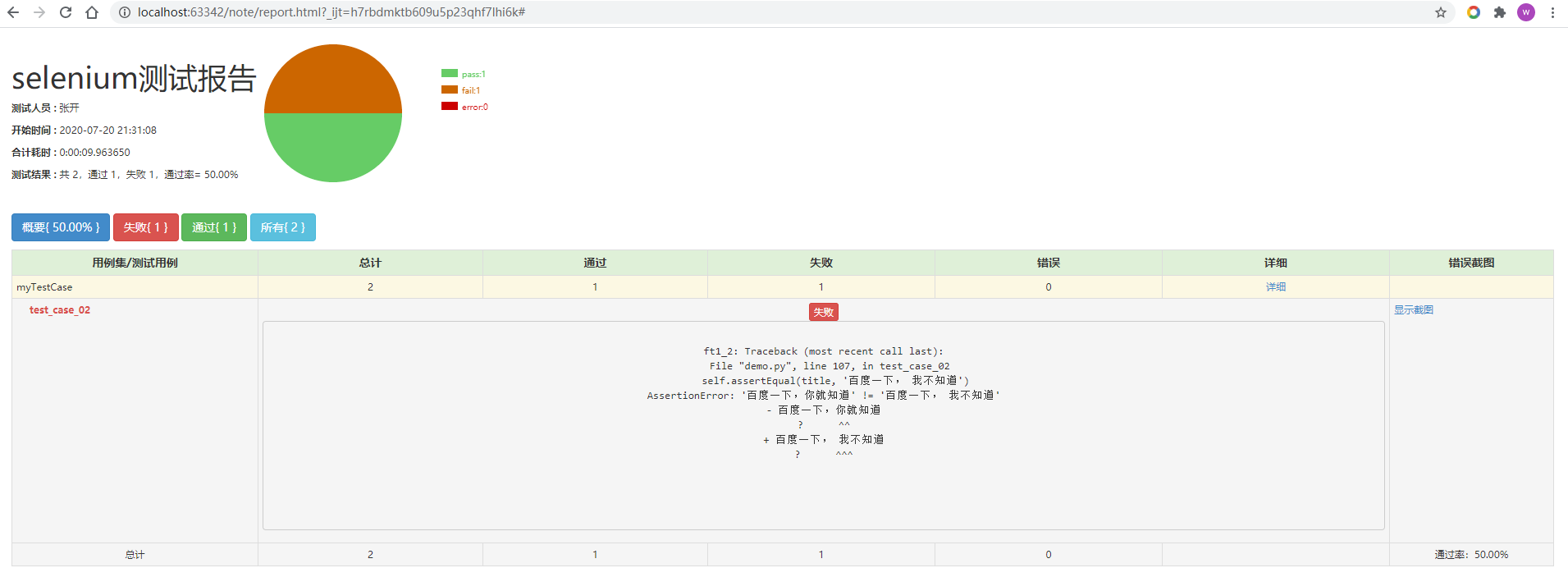
HTMLTestRunner for Python3.x selenium
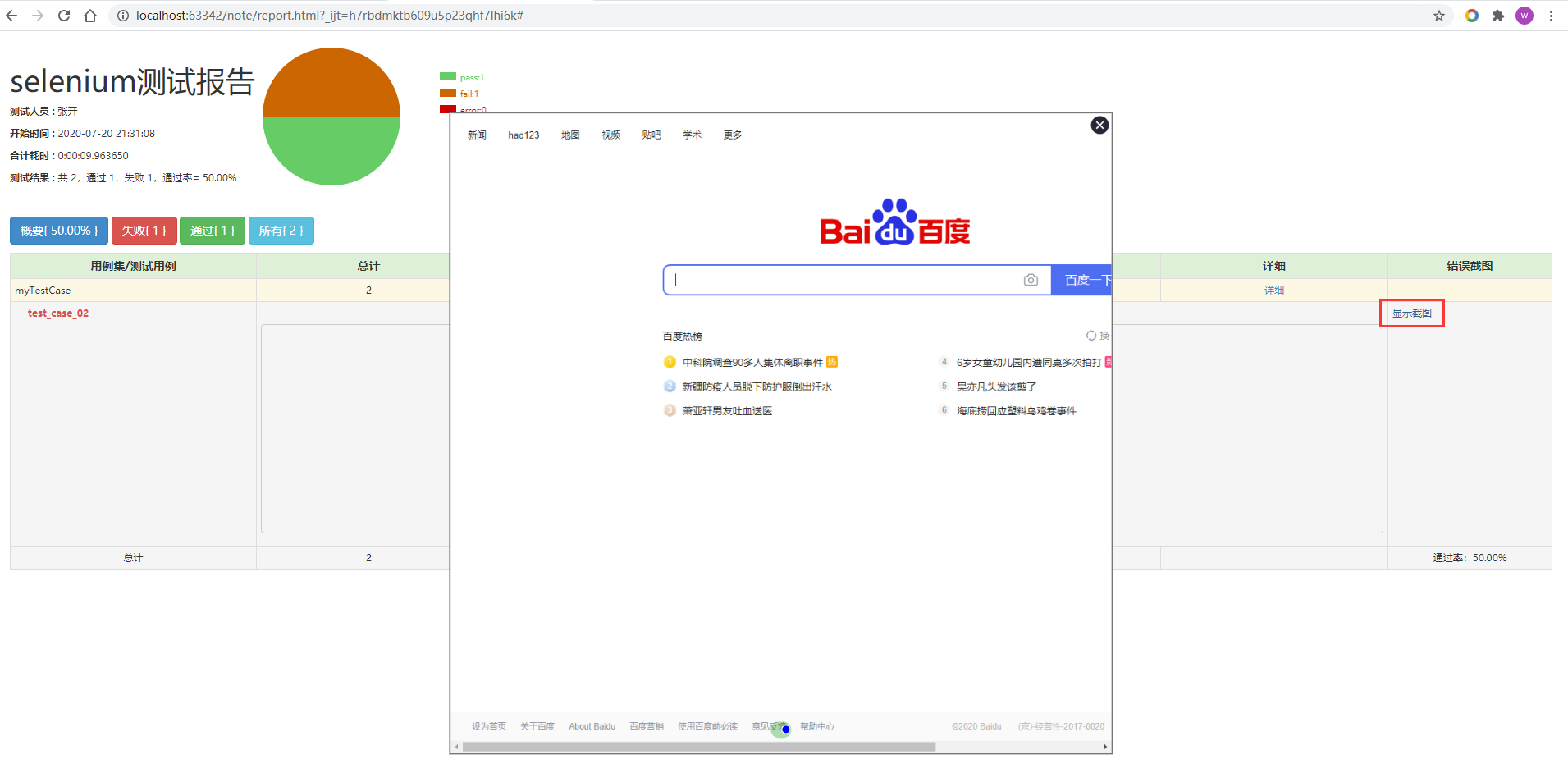
Using HTMLTestRunner.py with Selenium in a Python 3 environment — the main feature is that if an assertion fails, a screenshot of the error will be included.
import unittest
from selenium import webdriver
from HTMLTestRunner3_selenium import HTMLTestRunner  # Saved as HTMLTestRunner3_selenium.py


class myTestCase(unittest.TestCase):

    @classmethod
    def setUpClass(cls):
        cls.driver = webdriver.Chrome()
        cls.driver.implicitly_wait(10)

    def test_case_01(self):
        title = self.driver.title
        self.assertEqual(title, 'Baidu - You will know')

    def test_case_02(self):
        title = self.driver.title
        self.assertEqual(title, 'Baidu - I do not know')

    def setUp(self):
        self.driver.get('https://www.baidu.com/')

    @classmethod
    def tearDownClass(cls):
        cls.driver.quit()


if __name__ == '__main__':
    suite = unittest.makeSuite(testCaseClass=myTestCase)
    with open('./report.html', 'wb') as f:
        HTMLTestRunner(
            stream=f,
            verbosity=2,
            tester='Tester Name',
            title='Selenium Test Report'
        ).run(suite)
In this Selenium version, only the logic needs attention — when an assertion fails, a corresponding screenshot will be saved.
Effect example:
BSTestRunner for Python3.x
Here is how to use BSTestRunner.py in a Python 3 environment:
import requests   # pip install requests
import unittest
import ddt   # pip install ddt
import BSTestRunner3   # Saved BSTestRunner Python3 version as BSTestRunner3.py


data_list = [
    {"url": "https://cnodejs.org/api/v1/topics", "method": "get"},
    {"url": "https://cnodejs.org/api/v1/topic/5433d5e4e737cbe96dcef312", "method": "get"},
    {"url": "https://cnodejs.org/api/v1/topic_collect/collect", "method": "post"},
    {"url": "https://cnodejs.org/api/v1/topic_collect/de_collect", "method": "post"},
    {"url": "https://cnodejs.org/api/v1/user/alsotang", "method": "get"},
    {"url": "https://cnodejs.org/api/v1/message/mark_all", "method": "post"},
]


@ddt.ddt
class MyCase(unittest.TestCase):
    @ddt.data(*data_list)
    def test_case(self, item):
        response = requests.request(
            url=item['url'],
            method=item['method']
        )
        # print(item['url'])   # BSTestRunner will error if there are print statements when generating reports
        self.assertEqual(response.status_code, 200)


if __name__ == '__main__':
    suite = unittest.makeSuite(testCaseClass=MyCase, prefix='test')
    with open('./report.html', 'wb') as f:
        BSTestRunner3.BSTestRunner(
            stream=f,
            title='DDT Example Report',
            description='Demonstrating the combined use of ddt and HTMLTestRunner',
            verbosity=2,
        ).run(suite)
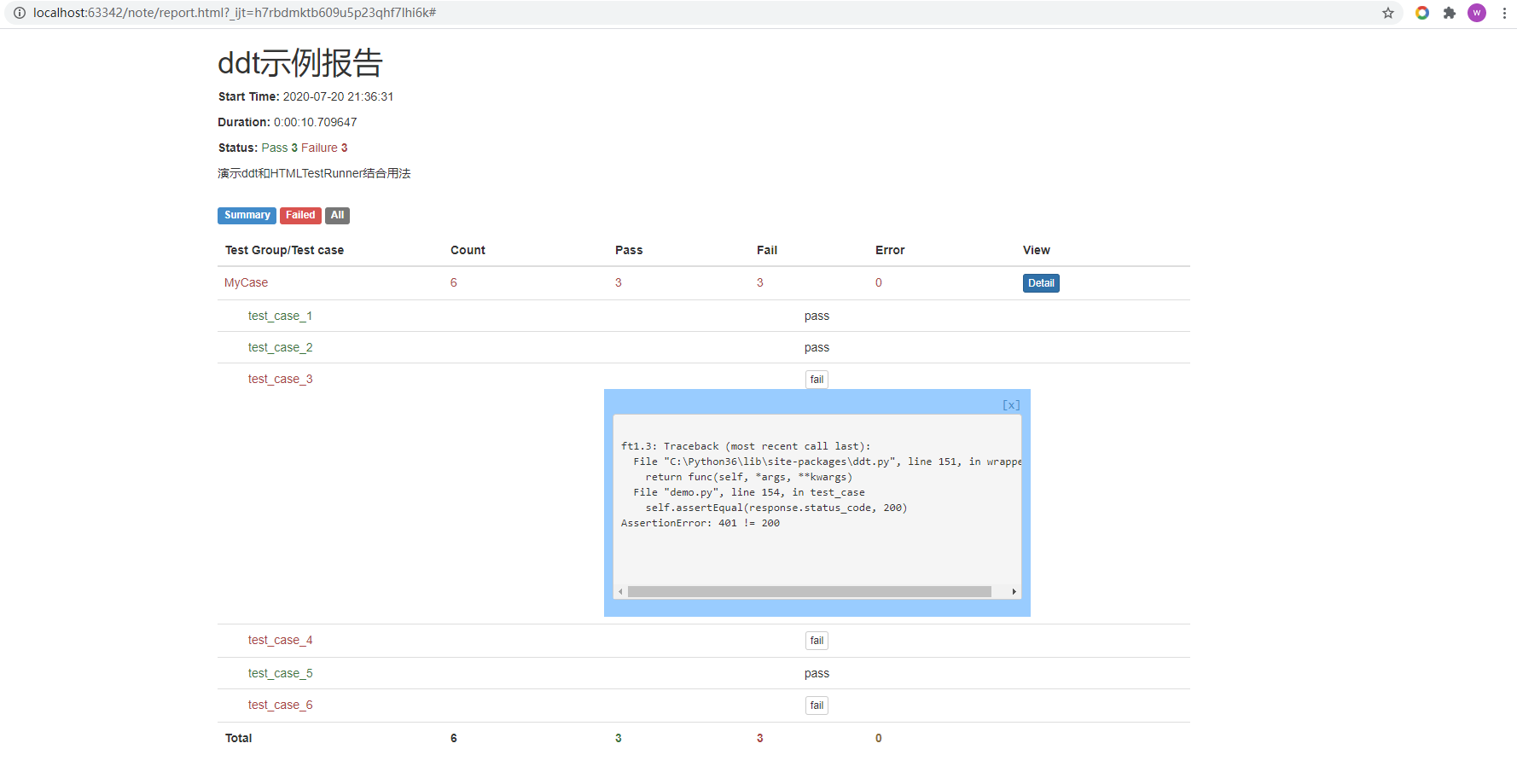
Usage is consistent with HTMLTestRunner.
Effect example:
Sending Test Emails
With a test report, we can send it by email.
Python’s email functionality uses the smtplib and email modules.
import unittest
import smtplib
import HTMLTestRunner
from email.mime.text import MIMEText
from email.mime.multipart import MIMEMultipart
from email.header import Header


class TestStringMethods(unittest.TestCase):

    def test_upper(self):
        """Check if foo.upper() equals FOO"""
        self.assertEqual('foo'.upper(), 'FOO')

    def test_isupper(self):
        """Check if Foo is in uppercase form"""
        self.assertTrue('Foo'.isupper())


def get_case_result():
    """Get test case report"""
    suite = unittest.makeSuite(TestStringMethods)
    file_path = r'M:\tests\result.html'
    with open(file_path, 'wb') as f:
        HTMLTestRunner.HTMLTestRunner(
            stream=f,
            title='HTMLTestRunner version upper test report',
            description='Test case execution status for upper').run(suite)
    f1 = open(file_path, 'r', encoding='utf-8')
    res = f1.read()
    f1.close()
    return res


def send_email():
    """Send email"""

    # Third-party SMTP service
    mail_host = "smtp.qq.com"  # Set server
    mail_user = "[email protected]"  # Username
    mail_pass = "chmbpeciazgjgegi"  # Password

    # Set sender and recipients
    sender = '[email protected]'
    receivers = ['[email protected]', '[email protected]']  # Recipients

    # Create an instance with attachment
    message = MIMEMultipart()

    # Email subject, recipients, sender
    subject = 'Please review -- test report'  # Email subject
    message['Subject'] = Header(subject, 'utf-8')
    message['From'] = Header("{}".format(sender), 'utf-8')  # Sender
    message['To'] = Header("{}".format(';'.join(receivers)), 'utf-8')  # Recipients

    # Email body content in HTML form
    send_content = get_case_result()  # Get test report
    html = MIMEText(_text=send_content, _subtype='html', _charset='utf-8')  # First parameter is email content

    # Build attachment
    att = MIMEText(_text=send_content, _subtype='base64', _charset='utf-8')
    att["Content-Type"] = 'application/octet-stream'
    file_name = 'result.html'
    att["Content-Disposition"] = 'attachment; filename="{}"'.format(file_name)  # filename is what appears in email attachment
    message.attach(html)
    message.attach(att)

    try:
        smtp_obj = smtplib.SMTP()
        smtp_obj.connect(mail_host, 25)  # 25 is the SMTP port number
        smtp_obj.login(mail_user, mail_pass)
        smtp_obj.sendmail(sender, receivers, message.as_string())
        smtp_obj.quit()
        print("Email sent successfully")

    except smtplib.SMTPException:
        print("Error: Unable to send email")


if __name__ == '__main__':
    send_email()
When sending test reports using the HTMLTestRunner template, QQ Mail and 163 Mail may have some rendering issues — HTML content cannot load CSS styles, but attachments are fine. This indicates that each email service provider has different server settings. Don’t worry about these details; as long as the attachment is fine, that is OK.
unittest.mock
Omitted from this document — see the dedicated article on this topic instead.
Summary: Key classes to master in unittest:
unittest.TestCase: The base class for all test cases. Given the name of a test method, it returns a test case instance.unittest.TestSuite: Organizes test cases into a test suite; supports adding and removing test cases.unittest.TextTestRunner: Executes test cases. “Text” means test results are displayed in text form. Test results are saved toTextTestResult.unittest.TextTestResult: Stores test case information, including how many test cases were run, how many succeeded, how many failed, etc.unittest.TestLoader: LoadsTestCaseintoTestSuite.unittest.defaultTestLoader: Equivalent tounittest.TestLoader().unittest.TestProgram: TheTestProgramclass name is assigned to themainvariable, then called in the form ofunittest.main().